Wednesday, June 30, 2010

Cisco Cius Tablet Powered by Android


With one product announcement, Android goes from Enterprise outcast to forerunner.

If your enterprise doesn't use a VoIP call center from Cisco or Cisco networking equipment in your server room, it still likely uses Cisco's Webex for video calling. Pretty soon those Cisco salespeople are going to be calling up your Director of IT and pitching them on what appears to be a very cool little Android tablet called Cius.

It may one day soon replace your office phone. And your mobile phone. And maybe even your laptop.

Cius is a 7-inch Android tablet that does a few things that will get business users excited. First, as an Android device, it has a solid browser that operates over Wifi or 3G/4G (and they even say via Ethernet - this is Cisco after all). Business-based web apps can be accessed locally or through a VPN client. It also appears to offer a virtual desktop through a Citrix-type client for legacy applications.

The main focus appears to be video conferencing and taps into all of Cisco's VoIP and Telepresense software. They even mention 720P video conferencing, which would seem to indicate a very densely pixeled screen and HD camera.

Cisco also mentions a collaborative Android Marketplace relationship where they offer developers a chance to work with Cisco's technology and at the same time Cius users can dive into the Android Marketplace (assuming with the IT Director's blessing) for apps.
  

Tuesday, June 29, 2010

GMAIL is now in HTML5


In keeping with Google's enthusiasm for the emerging HTML5 standard, many upcoming features of the company's Gmail Web-based e-mail service will be rendered in HTML5, said Adam de Boor, a staff software engineer working on the service.

"We have things that we can do much more efficiently in HTML5," said De Boor, speaking Thursday at the Usenix WebApps '10 in Boston.

"HTML5 is exciting to me insofar as to how many browser makers are adopting it," he said, adding, "I have high hopes for IE9."

One of the chief benefits he pointed to is how the standard could speed the loading and execution time of Gmail.

Google's current goal is to get Gmail to load in under a second. "Speed is a feature," he said.

Early tests have proved promising. For instance, Gmail looks for those browsers that can work with version 3 of the Cascading Style Sheets (CSS), a standard closely related to HTML5. If the browser supports CSS3, Gmail will render the pages using these specifications, rather than its traditional approach of using the Document Object Model (DOM). The company has found that using CSS3 can speed the rendering time by 12 percent.

HTML5 will also help in building new features. One feature that the Gmail design team is now working on is the ability to drag files from the desktop into the browser.

This feature will be important in that it will bring Web applications even closer in feature functionality to desktop applications, de Boor said.

Gmail will also make use of HTML5's database standards. Now, the e-mail service uses Google Gears to store mail for offline reading, but over time that will migrate to the HTML5 standards.

De Boor also talked about adding new features that couldn't be rendered using HTML5.

One will be the ability to drag files from the browser window onto the desktop. To do this, his team is working on a new data transfer protocol, called "downloadurl."

"We tried to get this in HTML5," but were unable to do so. He jokingly said that Google will have to lobby to have some of the functionality needed to make that happen added into HTML6, which, as of today, does not exist in any form.

Instead of rendering it into a standard, the company will "encourage other browsers to use it," he said.

He noted that the company doesn't wasn't to revisit the "browser wars" of the last decade. "We tried to learn from history and be much more cooperative to the other browser makers," he said.

Another new feature he talked about was something called "Magic iFrame," which would allow a user to take part of a Web page, rendered in a frame, and pull it out and make it its own full Web page in a new browser window.

Currently, the Gmail program is comprised of 443,000 lines of JavaScript, with 978,000 lines if comments are included. All of it was written by hand, he said.

During the question-and-answer session, De Boor was asked if he was comfortable using JavaScript for such a large project.

He admitted that another language, such as Java itself, might be more optimized, but he also noted that Java is a lot more verbose as well. "At this point to me it's a matter of choice which language you use," he said. He defended JavaScript's performance, though.

"Most of the irritation around JavaScript comes from how it is implemented in browsers," he said.

Monday, June 21, 2010

Toshiba Libretto W100, a Dual-Screen Answer to iPad

As a part of the 25th anniversary of Toshiba’s laptop business, the company unveiled a dual-screen laptop concept named the Libretto W100. Although Toshiba calls it a concept PC, it looks very finished and ready for market release, which Toshiba claims will be later this summer, albeit in a limited capacity (the price is reported to be $1099). As far as specifications go, one thing definitely stands out: dual 7.0-inch multi-touch displays with 1024×600 pixel resolution, together with a virtual keyboard with haptic response. It’s powered by an Intel Pentium U5400 CPU operating at 1.2 GHz, 2 GB of DDR3 memory, and a 64 GB SSD, which makes it a fairly powerful machine. Other specs include a 1-megapixel webcam, Bluetooth, MicroSD card, Wi-Fi, one USB port, an 8-cell battery, while the operating system is Windows 7. It’s also a very portable device, measuring merely 4.84 inches by 7.95 inches when closed, and weighing 1.8lbs.

Check out some more images and video of the Libretto W100 below.
  

Friday, June 18, 2010

5 Free and Open-Source Software Alternatives for Small Businesses

If you’re part of a small business, chances are you’re always looking for ways to save money. What many business owners and managers don’t realize is that they can get all the software they need to run a business — quite literally all of it in most cases — 100% free of charge. That includes operating systems, word processing programs, accounting software, email servers, graphic design programs and more.

If you put in some time to do some research, you might find perfectly free software alternatives that work just as well as Microsoft Office, Adobe Photoshop, QuickBooks, and other better-known programs.

Best of all, since FOSS is free to download and try, there’s no risk in testing it out. Take a look at some of these programs and see if a few of them would fit your business needs. You lose nothing by giving them a try, and if they are a good fit, you could save hundreds or even thousands of dollars in licensing fees and upgrades.
 
OpenOffice is an open-source alternative to Microsoft Office and similar software suites. It’s absolutely free to download, and it contains programs for word processing, spreadsheets, presentations, graphics databases and more.
The interfaces are familiar and intuitive; in other words, even if you happen to realize you’re not in MS Word, you won’t feel lost or not know which buttons to click to get your work done. It is available in many languages and works on all common operating systems.
 
2. GNUCash 

GNUCash is a free program for personal and small-business accounting. It tracks bank accounts (including investments), revenue and expenses. Its features include tracking for customers, vendors, jobs, invoices, accounts payable, accounts receivable and detailed reporting, as well. You can import all your current data from programs such as Microsoft Money and Quicken, and you can also export data to spreadsheets, including Microsoft Excel spreadsheets.

Since accounting software is so integral to a business’ bottom line, this might be something you’d want to test first before you make a full commitment to switching. If you’ve got a good grasp of other accounting programs, GNUCash will be second nature to you; however, if you’re new to such programs, reviews suggest you’ll still have a fairly easy time grasping its concepts, features and uses.

3. GIMP 

GIMP is a free Photoshop substitute that will satisfy all but the most demanding professional graphic designers. If you need to make simple web graphics, retouch a few product photos, or create flyers or other marketing materials, this program should work nicely for you. It’s robust, and if you’ve used Photoshop or Photoshop-like clone programs, the interface and commands will be familiar to you. The images you create can be saved in an array of common formats, including PSD Photoshop files, in case you need to send your files to a Photoshop user.

All in all, GIMP might be the single greatest money-saver on this list. It’s completely free, whereas a single Photoshop license — which you’ll need to pay for again each time Adobe releases a new version of the software — can cost hundreds of dollars per user.
 
4. Zimbra 

If you want a Microsoft Exchange-level email program for your business, including web, mobile and desktop email clients, but you don’t want to pay the licensing fees, you might consider Zimbra as an alternative. Its FOSS version is free of charge and available for immediate download. It’s compatible with most operating systems, including Mac and Windows, and it includes an address book, a calendar, document support and a task-management app, among other features.

This app also integrates natively with other mail clients, such as Outlook and Apple Mail. Lastly, Zimbra also uses a standards-based approach that supports POP, IMAP, iCal and more for importing email and calendar data from other programs.
 
5. Linux 

Sometimes called GNU/Linux, this family of operating systems is versatile, free, easy to customize, stable, beautiful, frequently updated and — let’s say it again — completely and utterly free, regardless of how many devices or users install it.

For years, there’s been the commonly held idea that Linux OSes are command-line intensive, difficult to use, easy to crash and generally for nerds only. Much of this “fear, uncertainty and doubt” has come from corporate entities that benefit most from these drastic misperceptions. While you might want to reach out for a little help when installing your Linux OS for the first time, you’ll be shocked at how simple and user-friendly a Linux distro (that’s short for “distribution,” the Linux term for version) can be. The interfaces are elegant and intuitive, much more so than even Windows or Mac for many users.

If you’re concerned about not being able to find programs that will run on a Linux machine, you can run any Windows applications you need by using Wine, a Windows emulator. Clearly, installing an entirely new operating system is a bigger commitment than switching from MS Office to OpenOffice, but the rewards (and the short- and long-term savings) are much, much greater. If you’re hesitant about making the commitment, try installing a distro such as Ubuntu on a personal laptop or netbook until you get a feel for it and are confident it will work for your business.

TOSHIBA launches 11 new laptop model in INDIA

Toshiba India, PC Division has introduced 11 new laptop models under its Satellite and Satellite Pro brands. 

A mixed collection of Intel and AMD processors’ based machines, the range comes in varying screen sizes of 14 and 15.6 inches. The new models are available in red, blue, maroon brown and carbon black.
Announcing this launch, Sivakumar N., General Manager, TIPL (PC Division), said, “Toshiba PC Division is focused on the Indian market and intends to fortify its presence and product portfolio in the country. The strategy to expand our product lineup with these new models will now offer the customer a range of over 21 models to choose from. We understand that the Indian customer not only seeks affordable quality but also variety that can be enabled only through design and technology.” 

The Satellite Pro Series is positioned towards SMBs and comes with a host of security features and a three year warranty as standard. Dressed in a carbon black textured finish, the new series looks thinner and wider. The price range starts from as low as Rs. 26,490 along with gifts such as an optical mouse, a Bluetooth dongle and a backpack (worth Rs. 5,000). 

The Satellite L Series laptops are equipped with the latest processors and HD widescreen LED backlit displays with native 720p resolution and dedicated graphics on select models. These laptops are aimed at the Home/SOHO markets. The hard drives range from 320 to 500 GB and come with data protection HDD capabilities. Other features include built-in high-speed wireless connectivity, many expansion ports and the 2010 Intel Core and the latest AMD Processors. The Satellite L Series is available in a wide variety of colors combined with patterns and starts from a price of Rs. 32,990 along with gifts such as an optical mouse and backpack worth Rs. 4,500.
Toshiba Satellite L505-GS5037 TruBrite 15.6-Inch Laptop (Black)Toshiba Satellite L555D-S7005 TruBrite 17.3-Inch Laptop (Black)Toshiba Satellite L505-ES5015 TruBrite 15.6-Inch Laptop (Silver/Black)Toshiba Satellite T135-S1330 TruBrite 13.3-Inch Ultrathin Laptop (Black) 

Thursday, June 10, 2010

iPHONE vs ANDROID NEXUS ONE

If your a mobile phone power user but are still in a dilemma between which is the best device for you. Either iPhone or Android and not quite sure which way to go with your next mobile phone purchase. The team over at Lifehacker have put together an in-depth review of both the software and hardware comparing like-for-like across a number of different criteria.

The evaluation takes into consideration 20 features that users are most likely to care about. The table below indicates which mobile device LifeHacker thought was strongest in that area. For example an Apple under the iPhone
means that the iPhone is stronger in this area. To read the full evaluation check out the article on Lifehacker 


Wednesday, June 9, 2010

This FIFA World Cup Show Your Color With the USB Flash Drives

Amkette, the leaders in digital storage and lifestyle peripherals is all set to show its spirit to cheer for FIFA WORL CUP'10. Amkette is offering a treat to all true soccer lovers, Amkette World Cup Series Flash Drives which have been designed in the shape of a jersey sporting the color of your favorite team. The World Cup jersey shaped USB Drive comes with 4 GB storage capacity. It features USB 2.0 connection, works like other USB drives which requires no driver, allows plug and play function to work on various Os including Windows 7, Vista, XP, 2000 and Mac OS.


The 4GB World Cup commemorative flash drives are suited up and ready to play, in the team jersey of three of the top soccer teams this year, Red for Spain, Yellow for Brazil and White for England are ready to score on your USB port. The jersey also has a lanyard for easy attachment with your cell phone or key ring.

Features : -

Elegant sporty look
Available in different team colors to cheer your favorite team in World Cup – Red for Spain, Yellow for Brazil and White for England
Spain is favorite to win, Brazil is all time best and England is the most supported in India


Pricing and Availability : -

These flash drives are available at e-Zone, Jumbo, Landmark, Hypercity and at leading Amkette re-sellers across India. Additionally order them online from eBay, Homeshop18, Ibibo, Rediff etc. The MRP is Rs. 990. 

Tuesday, June 1, 2010

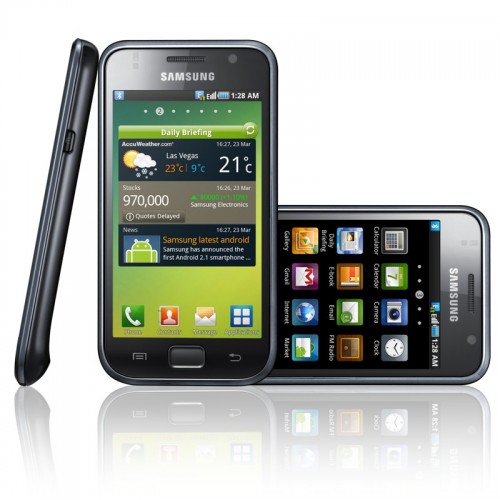
SAMSUNG Galaxy S i9000 Phone


JK Shin, president and head of Samsung Electronics’ Mobile Communications Business announced the global launch of the  Galaxy S (Model: GT-I9000) at his keynote speech at CTIA Wireless 2010. The Galaxy S will be sold in Europe, North America, Latin America, Australia, and Asia this year. This handset is powered by a 4 inch super AMOLED display and Android 2.2 Froyo and uses a 1 GHz CPU. Samsung aims to Democratize of Smart Phone or in other words bring smart phone the masses.

Samsung Galaxy S i9000 Full Specifications: 

Network : 2.5G (GSM/ GPRS/ EDGE) : 850 / 900 / 1800 / 1900 MHz3G (HSDPA 7.2Mbps, HSUPA  5.76Mbps) : 900 / 1900 / 2100 MHz
 
OS : Android 2.1
 
Display : 4.0” WVGA SUPER AMOLED (800×480) with mDNIe
 
Camera : 5.0 mega-pixel Camera + VGA Video Telephony Camera, Auto Focus,Self shot, Action shot, Add me, Stop motion, Cartoon shot, Smile shot,Panorama shot.
 
Video : HD(720p@30fps) video playing & recordingCodec: mpeg4, H.264, H.263, H263Sorenson, DivX HD/ XviD, VC-1 .
Format : 3gp (mp4), WMV (asf), AVI (divx), MKV, FLV
 
Audio : MP3, AAC, AAC+, eAAC+, WMA, OGG, AMR-NB, WAV, MID, AC3AC3, IMY,FLAC, XMF
 
Value-added Features : Integrated Messaging ‘Social Hub’, Android Market for more applications and contents, A-GPSA-GPS, Augmented Reality with LayarLayar Reality Browser, 1 GHz Application Processor, SMS/ MMS/ Email/ Video Messaging/ Exchange ActiveSync, Sensor: Accelerometer, Digital compass, Proximity, Light Offline & No SIM Mode, Voice Command,RSS ReaderReader, Mobile Widgets, Smart Security.

Connectivity : Bluetooth technology v 3.0USB v2.0 (High-Speed), Wi-Fi 802.11 b/g/n.

Memory : 16GB / 8GB, external memory slot (up to 32GB)
 
Size : 64.2 x 122.4 x 9.9mm, 118g
 
Battery : 1500 mAh

Price : The price of this phone has not been announced so far . But we expect it to be below $500 or Rs.23000 approx if Samsung wants to bring the phone to the masses.